Welcome, Guest. Please login or register.
Did you miss your activation email?
May 28, 2012, 12:50:12 PM

Login with username, password and session length
Search:     Advanced search
* Home Help Search Calendar Links Login Register
+  Machsupport Forum
|-+  General CNC Chat
| |-+  Show"N"Tell ( Your Machines)
| | |-+  My MPG remote and macropump file
Pages: 1 2 »   Go Down
Print
Author Topic: My MPG remote and macropump file  (Read 3693 times)
0 Members and 1 Guest are viewing this topic.
chl
Active Member

Offline Offline

Posts: 13


View Profile
« on: March 30, 2007, 02:38:43 PM »

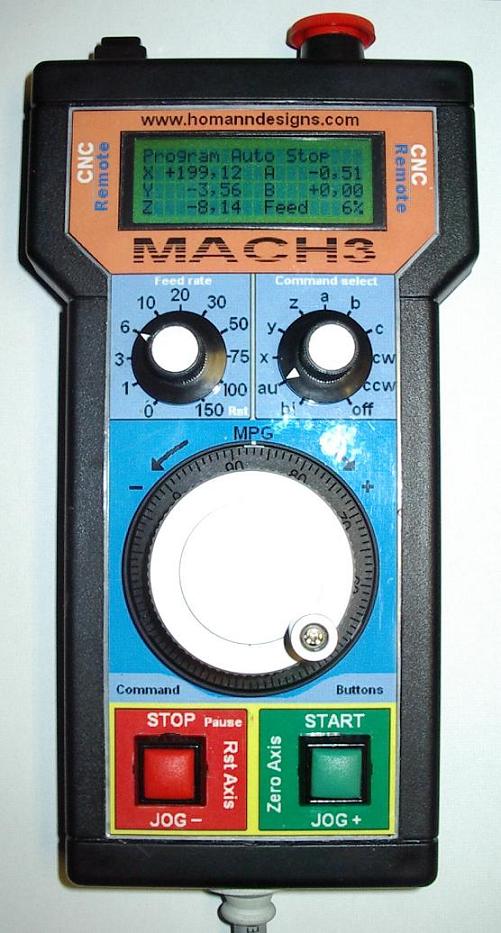
Hi all i have done my modio controlled pendant ready....it seems to work fine.
Now i have to build my second machine ready so i can use my new remote  Smiley

Some info about it

In program run mode ....single or auto
hold start button for 1 sec and program starts....(for safety reason)
hold stop button less than 1 sec pause the program
hold stop button more than 1 sec stops program
MPG is disable

Jog mode x-c axis
start button jog axis + with selected feedrate
stop button jog axis - with selected feedrate
if i turn feed knob to 150% then
start zero selecet axis and stop restore axis value (must hold down for 1 sec )
the mpg wheel has this values
if feedrate knob 0-6% then mpg is in stepmode 0.01mm 
if feedrate knob 10-30% then mpg is in stepmode 0.10mm 
if feedrate knob 40-100% then mpg is in Constant Velocity 

cw and ccw mode
hold start for 1 sec starts spindle with 150rpm then
every push on start button step up spindle with 50 rpm and
every push on stop button less than 1 sec step down spindle with 50 rpm
Hold stop for more than 1 sec stops spindle

Screen button
Toggles the To Go screen

And Estop
stops all i hope Wink

Off = offline
mpg disable
Thats all Wink

A little video on the pendant
www.lcgl.se/video/mympg.wmv

My macropump file

« Last Edit: September 12, 2007, 10:22:59 AM by chl » Logged
Hood
Guest
« Reply #1 on: March 30, 2007, 03:40:29 PM »

Very nice, how did you make the decals?

Hood
Logged
chl
Active Member

Offline Offline

Posts: 13


View Profile
« Reply #2 on: March 30, 2007, 04:00:53 PM »

Hi i made the decal in ms paint and print it out....then i cut it out and laminati it.
Logged
Hood
Guest
« Reply #3 on: March 30, 2007, 04:53:22 PM »

nice idea, never thought of laminating, thanks for the tip.
Hood
Logged
Chaoticone
South Carolina, US
Administrator
*
Offline Offline

Posts: 3,598


Precision Chaos


View Profile WWW
« Reply #4 on: March 30, 2007, 07:20:23 PM »

Very nice, do you plan on selling any of these?

Brett
Logged

Grin If you could see the things I have in my head, you would be laughing too. Grin
www.precisionchaos1.com
My guard dog is not what you need to worry about!
chl
Active Member

Offline Offline

Posts: 13


View Profile
« Reply #5 on: March 31, 2007, 02:46:19 AM »

Hi...i have no plan to sell any Wink
Logged
ardor
Active Member

Offline Offline

Posts: 137


View Profile
« Reply #6 on: March 31, 2007, 11:47:31 PM »

Hi...i have no plan to sell any Wink


Yet
Logged

There is no approved dental use for WD40
bcromwell
Active Member

Offline Offline

Posts: 31


View Profile
« Reply #7 on: April 09, 2007, 03:51:32 PM »

Where did you buy the case from? That looks very nice, I would buy one if you sold them!

Logged
chl
Active Member

Offline Offline

Posts: 13


View Profile
« Reply #8 on: April 10, 2007, 10:13:05 AM »

Hi...the case is from http://www.elfa.se/elfa-bin/setpage.pl?http://www.elfa.se/elfa-bin/dyndok.pl?lang=se&dok=4699.htm
TBT-2/9002 black is the one i have..
Its has a very good size for a pendant.... Smiley
Logged
stephenmtate
Active Member

Offline Offline

Posts: 2


View Profile
« Reply #9 on: April 24, 2007, 05:33:20 PM »

Awsom....

Any chance of posting a parts list, artwork, code and maybe a few pictures of the inside?

Steve
Logged
Pages: 1 2 »   Go Up
Print
Jump to:  

Powered by MySQL Powered by PHP Powered by SMF 1.1.16 | SMF © 2011, Simple Machines Valid XHTML 1.0! Valid CSS!