Welcome, Guest. Please login or register.
Did you miss your activation email?
May 28, 2012, 09:22:54 AM

Login with username, password and session length
Search:     Advanced search
* Home Help Search Calendar Links Login Register
+  Machsupport Forum
|-+  Mach Discussion
| |-+  General Mach Discussion
| | |-+  Drilling 3 holes on a lathe
Pages: 1   Go Down
Print
Author Topic: Drilling 3 holes on a lathe  (Read 168 times)
0 Members and 1 Guest are viewing this topic.
mc
Active Member

Offline Offline

Posts: 17


View Profile
« on: November 28, 2011, 03:35:43 PM »

Sounds simple, doesn't it?
And I'm sure it should be, but I'm really struggling to get my head around it!

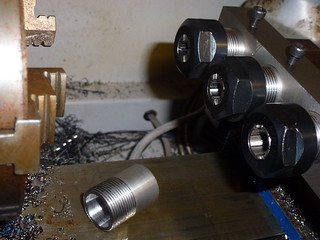
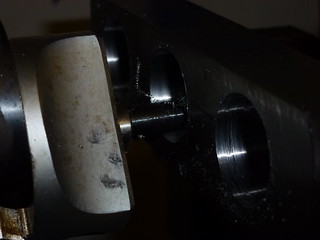
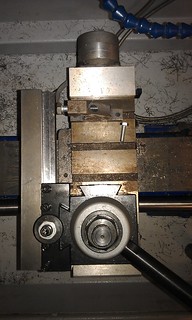
I'm working on a gang tool bar that fits in the QCTP to mount drills/reamers in via ER25 collets, and I'm now at the point where I need to drill 3 holes, 40mm apart.
I've managed to turn a few bits, including a couple threads, using the wizards, but I figured I should really learn a bit more about G-codes instead of relying on wizards.
So, after reading the manual, and trying various options, I finally tracked down the lack of movement to the G83 macro being missing from the profile folder, so I copied the standard one across from the default turn profile folder (I found the thread with the 'fixed' M83 version, but I figured I'd stick with the original one for now)

However, although I can get movement in the Manual screen by typing in G83 X0 Z-5 Q1 R1, the line doesn't even show once saved to a file and loaded in the Auto screen.
I'd like to create a file that will drill the three holes in one run, so I can edit it as I swap drill bits.

Anybody got any pointers on how to achieve this?
Logged
chrisjh
Active Member

Offline Offline

Posts: 90


View Profile
« Reply #1 on: November 28, 2011, 04:48:42 PM »

Hi,

The method I use with my gang tool setup is to call G52 offsets for the X & Z Postions of each drill tip relative to a Master Tool Tip Position.  In your case each drill will need to be offset by 40mm.  

eg G52 X40 Z0 for the 2nd Drill (assuming the first drill is the master tool and that the tip of the 2nd Drill is aligned in the Z plane with the tip of the 1st drill).  

Don't forget to cancel the G52 Offset when each successive drill has completed its task with a G52 X0 Z0 before moving to the next drill position and on completion of the 3 drilling job.  

Make sure that you withdraw each drill to a safe Z position ( I use 20mm) before calling the next drill.

As to the Drill cycles I use the peck drill macros here:

http://www.machsupport.com/forum/index.php?PHPSESSID=k39gqcfsarabqj4bmakqaon960&topic=15205.0

G83 does not work in Mach3 Turn.

Regards

Chrisjh
Logged
mc
Active Member

Offline Offline

Posts: 17


View Profile
« Reply #2 on: November 29, 2011, 03:42:07 PM »

Thanks for that.
Using some G52 offsets worked perfectly, although I discovered the limitations of the lathe, so I'll have to move the tool holder into the milling maching to rough bore the holes.
Logged
rcaffin
Active Member

Offline Offline

Posts: 280


View Profile
« Reply #3 on: November 29, 2011, 04:41:02 PM »

I'm working on a gang tool bar that fits in the QCTP to mount drills/reamers in via ER25 collets, and I'm now at the point where I need to drill 3 holes, 40mm apart.
Been there, done that, making 3 and 4 port tool head. Very useful for production - a poor man's Swiss lathe idea.

Note: doing this with the block mounted to the lathe saddle and the drill in the lathe chuck will give you the RIGHT height, so you can then use the block to hold drills. Doing it with a mill is prone to small but very annoying errors.

Quote
I've managed to turn a few bits, including a couple threads, using the wizards, but I figured I should really learn a bit more about G-codes instead of relying on wizards.
Absolutely. Sorry, but it's true imho.

There's a photo somewhere on this web site of what I made - not sure where right now, and I don't have the original any more.

Cheers

Logged
Pages: 1   Go Up
Print
Jump to:  

Powered by MySQL Powered by PHP Powered by SMF 1.1.16 | SMF © 2011, Simple Machines Valid XHTML 1.0! Valid CSS!