Home
Downloads
Mach3
Plugins
CAM Post Processors
Screensets
Purchase
Support
Forum
Tutorial Videos
Documentation
Yahoo Group
Mach Wiki
Resources
Contact Us
Links
CNCZone
German Forum
Italian Forum
Korean Forum
Portugese (Brazil) Forum
Russian Forum (RSK CNCROUTER)
Thai Forum
Welcome,
Guest
. Please
login
or
register
.
Did you miss your
activation email?
May 27, 2012, 03:05:58 PM
1 Hour
1 Day
1 Week
1 Month
Forever
Login with username, password and session length
Search:
Advanced search
Select from and to languages
Chinese-simp to English
Chinese-trad to English
English to Chinese-simp
English to Chinese-trad
English to Dutch
English to French
English to German
English to Greek
English to Italian
English to Japanese
English to Korean
English to Portuguese
English to Russian
English to Spanish
Dutch to English
Dutch to French
French to English
French to German
French to Greek
French to Italian
French to Portuguese
French to Dutch
French to Spanish
German to English
German to French
Greek to English
Greek to French
Italian to English
Italian to French
Japanese to English
Korean to English
Portuguese to English
Portuguese to French
Russian to English
Spanish to English
Spanish to French
Machsupport Forum
Mach Discussion
General Mach Discussion
Softlimit settings
Pages:
1
2
»
Go Down
« previous
next »
Author
Topic: Softlimit settings (Read 829 times)
0 Members and 1 Guest are viewing this topic.
sn96
Active Member
Offline
Posts: 37
Softlimit settings
«
on:
January 24, 2011, 07:59:42 PM »
Hello guys,
I have been playing with Mach3 trying to familiarize myself with the various menus and settings. There's a lot of settings! Anyway, In the motor home/soft limits dialog window it says "entries are in setup units". My units are set to inches but it appears that it is asking for mm values? It has to be mm because 100.00" would be over 8 feet long! that’s one huge milling table!
Logged
________________
Mike
Sherline 5400 with Sherline steppers
Visual Mill 6.0 Standard
Mach3
Windows XP
ger21
Global Moderator
Offline
Posts: 2,619
Re: Softlimit settings
«
Reply #1 on:
January 24, 2011, 08:53:04 PM »
or an average sized router.
Logged
Gerry
2010 Screenset
http://home.comcast.net/~cncwoodworker/2010.html
Overloaded
Global Moderator
Offline
Posts: 3,072
Re: Softlimit settings
«
Reply #2 on:
January 24, 2011, 09:14:46 PM »
Dont let the big default numbers confuse you Mike. Units are units, just set them to the extents of your machine.
Imagine a 10 foot router ... setup in MM. That would be 3048 !
Logged
"I haven't failed. I've just found 10,000 ways that won't work." Edison
"You cannot help men permanently by doing for them what they could and should do for themselves."
Abe Lincoln
sn96
Active Member
Offline
Posts: 37
Re: Softlimit settings
«
Reply #3 on:
January 24, 2011, 10:37:31 PM »
Ok I'm confused with the Z max settings. I keep getting softlimit errors that says "safe-z ignored, Z already higher than safe Z setting." When I try to start the program anyway, I get a pop-up that says "Soft limit warning.. continue? Yes /No" If I click yes, I get this error again "safe-z ignored, Z already higher than safe Z setting."
Here is a screen shot of my settings:
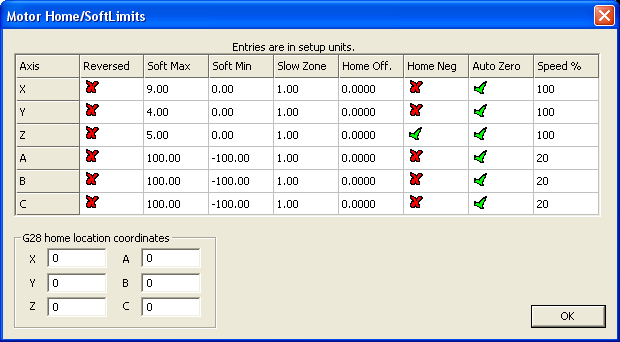
I have tried everything I tried swapping values clicking on reversed, home negative, larger values etc..
I tired the following:
MAX MIN
5.00 0
0 5.00
5.00 -5.00
-5.00 0
Now I am completely confused. None of these settings seem to work. My Z has about a 5" travel.

Logged
________________
Mike
Sherline 5400 with Sherline steppers
Visual Mill 6.0 Standard
Mach3
Windows XP
Hood
Active Member
Offline
Posts: 17,362
Carnoustie, Scotland
Re: Softlimit settings
«
Reply #4 on:
January 25, 2011, 02:14:09 AM »
Try with a Z Max of 0 and Z Min of -5
Hood
Logged
angel tech
Active Member
Offline
Posts: 259
Re: Softlimit settings
«
Reply #5 on:
January 25, 2011, 05:40:17 AM »
don't worry about the "100" setting, that's just a default figure. Are you homing before you set the soft limits.
Logged
angel tech
Active Member
Offline
Posts: 259
Re: Softlimit settings
«
Reply #6 on:
January 25, 2011, 05:41:52 AM »
also your home speed is a bit high at 100%, i would normally not go above 30%
Logged
sn96
Active Member
Offline
Posts: 37
Re: Softlimit settings
«
Reply #7 on:
January 25, 2011, 09:54:47 AM »
Quote from: Hood on January 25, 2011, 02:14:09 AM
Try with a Z Max of 0 and Z Min of -5
Hood
I think I tried this but I will try it again to see.
Logged
________________
Mike
Sherline 5400 with Sherline steppers
Visual Mill 6.0 Standard
Mach3
Windows XP
Hood
Active Member
Offline
Posts: 17,362
Carnoustie, Scotland
Re: Softlimit settings
«
Reply #8 on:
January 25, 2011, 10:05:12 AM »
Make sure its that way round, ie the Max is the Zero and Min is a negative value equal to your travel.
Hood
Logged
sn96
Active Member
Offline
Posts: 37
Re: Softlimit settings
«
Reply #9 on:
January 25, 2011, 11:31:36 AM »
Quote from: Hood on January 25, 2011, 10:05:12 AM
Make sure its that way round, ie the Max is the Zero and Min is a negative value equal to your travel.
Hood
Thanks for your help I really appreciate it.
I think I never tried those values to be honest. I did seem to have partial success when I set the Z limits to max 5.00 min -5.00, at least the soft limit errors went away, so it makes sense that max 0.00 min -5.00 would work. The problem I had with max 5.00 and min -5.00 was the zeroing. I wanted it to zero at 0 and not any other value.
I'm at work so I won't be able to try this until tonight. Bummer!
«
Last Edit: January 25, 2011, 11:33:38 AM by sn96
»
Logged
________________
Mike
Sherline 5400 with Sherline steppers
Visual Mill 6.0 Standard
Mach3
Windows XP
Pages:
1
2
»
Go Up
« previous
next »
Jump to:
Please select a destination:
-----------------------------
Mach Discussion
-----------------------------
=> General Mach Discussion
=> Mach3 under Vista
=> Quantum
=> Mach SDK plugin questions and answers.
===> Finished Plugins for Download
=> VB and the development of wizards
=> Brains Development
=> Video P*r*o*b*i*n*g
=> Mach Screens
===> Screen designer tips and tutorials
===> Works in progress
===> Finished Screens
===> Flash Screens
===> JetCam screen designer
===> Machscreen Screen Designer
===> CVI MachStdMill (MSM)
=> Feature Requests
=> Non English Forums
===> Italian
===> French
===> Spanish
===> Chinese
===> German
===> Russian
===> Romanian
===> Japanese
===> Vietnamese
=> FAQs
-----------------------------
*****VIDEOS*****
-----------------------------
=> *****VIDEOS*****
-----------------------------
General CNC Chat
-----------------------------
=> Share Your GCode
=> Show"N"Tell ( What you have made with your CNC machine.)
=> Building or Buying a Wood routing table.. Beginnners guide..
=> Show"N"Tell ( Your Machines)
-----------------------------
G-Code, CAD, and CAM
-----------------------------
=> G-Code, CAD, and CAM discussions
=> LazyCam (Beta)
-----------------------------
Third party software and hardware support forums.
-----------------------------
=> LazyTurn
=> GearoticMotion Preliminary testing
=> Tempest Trajectory Planner
=> Contec
=> dspMC/IP Motion Controller
=> HiCON Motion Controller
=> Third party software and hardware support forums.
=> Galil
=> Newfangled Solutions Wizards
=> Mach3 and G-Rex
=> Mesa
=> Modbus
=> NC Pod
=> PoKeys
=> SmoothStepper USB
=> Sieg Machines
=> Promote and discuss your product
-----------------------------
Tangent Corner
-----------------------------
=> Tangent Corner
=> Competitions
=> Polls
=> Bargain Basement
-----------------------------
Support
-----------------------------
=> Downloads
===> XML files
===> Post Processors
===> Macros
===> Tutorials
===> Others
===> Beta Brains
===> Screen Sets
===> Documents
===> MACH TOOL BOX
=> One on one phone support.
=> Forum suggestions and report forum problems.
-----------------------------
Mach4
-----------------------------
=> Mach4 pre-Alpha Testing
Loading...