Welcome, Guest. Please login or register.
Did you miss your activation email?
May 26, 2012, 03:51:40 PM

Login with username, password and session length
Search:     Advanced search
* Home Help Search Calendar Links Login Register
+  Machsupport Forum
|-+  Mach Discussion
| |-+  General Mach Discussion
| | |-+  How about an iPad as a Mach3 Pendant?
Pages: 1   Go Down
Print
Author Topic: How about an iPad as a Mach3 Pendant?  (Read 706 times)
0 Members and 1 Guest are viewing this topic.
BobWarfield
V4 Screen Contributor

Offline Offline

Posts: 95


View Profile WWW
« on: July 27, 2010, 11:46:41 PM »

How would you like to use it as a full-featured Mach3 pendant and even run G-Wizard too so you can check your feeds and speeds or do a quick calculation right at the machine?

All this when neither Mach3 nor G-Wizard can be run on the iPad. What gives? Or, how would you like to make a quick tweak to your CAM program, but it's on a machine in another room from where your PC is located? Tweak and fire up the DNC right from your iPad.

Find out how I did it here:

http://www.cnccookbook.com/CCiPad2PC.html

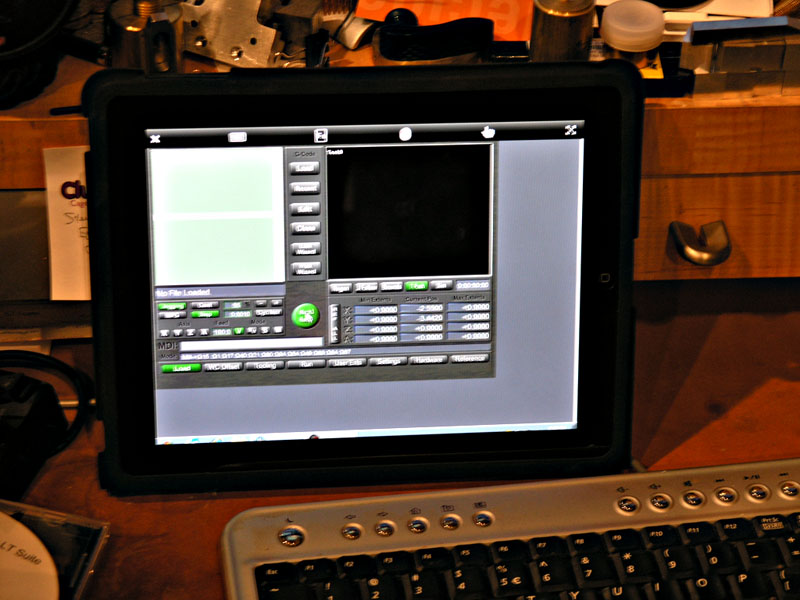
and you'll soon be doing this:


Sorry for the somewhat blurry photo, it was dim in my office and I was excited.  That's the new Mach Standard Mill screen set running on the iPad.

More testing needed, but for circa $12 (well, you do have to already have an iPad, but what an excuse for you to get one!), this is pretty cool. The biggest issues so far is you have to double tap the "mouse" just right to start a program, and there are no arrow keys, which Mach3 uses for jogging.  Just need a slightly updated screenset to optimize for the iPad.

A lot of folks don't like to run the Internet on their Mach3 machine. They want to keep the machine lean and mean and dedicated to Mach3 so there are no hiccups. Here's your chance to access the Internet, G-Wizard (which wants an Internet connection), and get a fancy new pendant all at the same time.

Cheers,

BW

Logged

Try G-Wizard Machinist's Calculator for free:

http://www.cnccookbook.com/CCGWizard.html
Sam
THIS SPACE FOR RENT.
Global Moderator
*
Offline Offline

Posts: 834


View Profile WWW
« Reply #1 on: July 28, 2010, 08:12:35 AM »

Thanks for sharing the heads up on that, Bob. While I'm at it, thanks for sharing everything else, too. Your site is certainly a treasure trove of information.
Logged

"I sometimes think we consider the good fortune of the early bird and overlook the bad fortune of the early worm." FDR - 1922

"CONFIDENCE: it's the feeling you experience before you fully understand the situation."
Regnar
Active Member

Offline Offline

Posts: 7


View Profile
« Reply #2 on: July 29, 2010, 12:59:21 AM »

For those of you who want to run Mach off a laptop you can do pretty much the same thing that Bob mentioned with LogMeIn for free. I use this program for my Home Theater and it works great. It allows you to turn on and off computer with lan and use the full keyboard. It does require Internet Access. Here is a video of the setup process.

http://www.youtube.com/watch?v=grEcJo06GF4
Logged

"Sue Sponte"
Pages: 1   Go Up
Print
Jump to:  

Powered by MySQL Powered by PHP Powered by SMF 1.1.16 | SMF © 2011, Simple Machines Valid XHTML 1.0! Valid CSS!