Welcome, Guest. Please login or register.
Did you miss your activation email?
May 26, 2012, 04:03:37 AM

Login with username, password and session length
Search:     Advanced search
* Home Help Search Calendar Links Login Register
+  Machsupport Forum
|-+  Mach Discussion
| |-+  General Mach Discussion
| | |-+  Why is it running off at random?
Pages: 1 2 3 4 »   Go Down
Print
Author Topic: Why is it running off at random?  (Read 1330 times)
0 Members and 1 Guest are viewing this topic.
SpookyDad
Active Member

Offline Offline

Posts: 16


View Profile
« on: June 01, 2010, 04:25:49 PM »

I am extremely frustrated! I am running a job that I have done several times before. I upgraded the computer and replaced the Xylotex controller since running this code. I tuned the motors by measurement and it is off by a couple of thou but that is as close as I can measure.

This is what is happening:
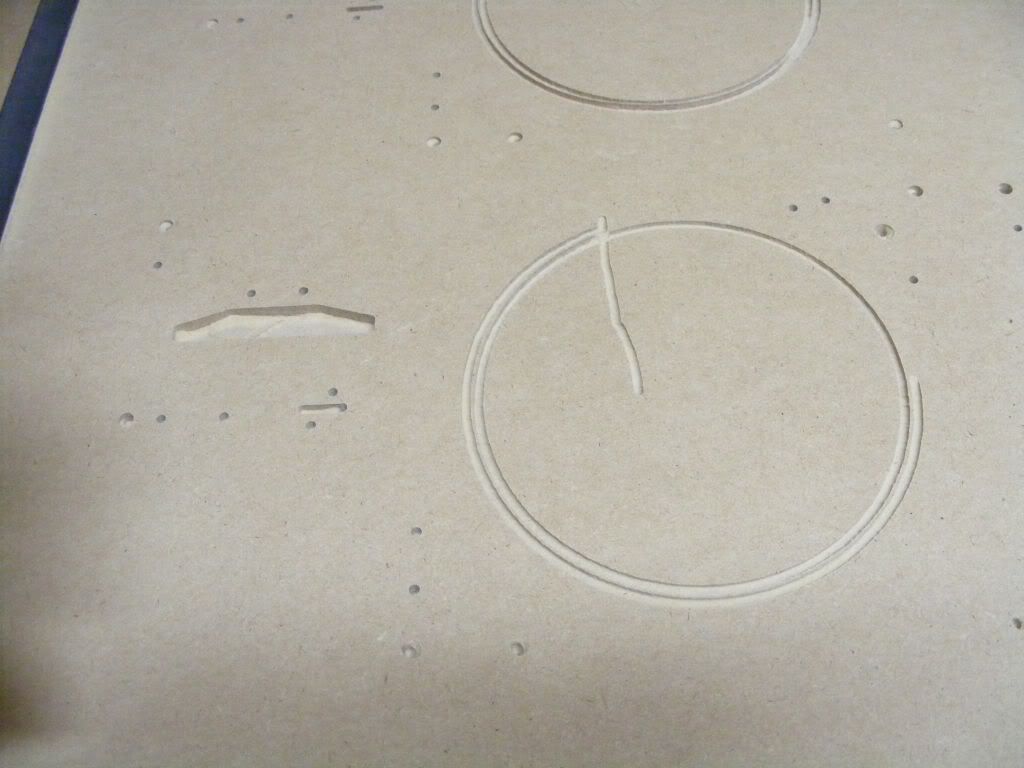


It has happened on another job over an hour into the run. It seems to happen 7/8 ths of the way through the run. THis run has 842 lines of code but the other one has 4500. I thought it might be a memory problem but this run is small.

I am running XP Service pak 2

Logged
Hood
Active Member

Offline Offline

Posts: 17,345


Carnoustie, Scotland


View Profile
« Reply #1 on: June 01, 2010, 04:32:09 PM »

Do the DROs  and Toolpath show the position of the code or the tool when it goes wrong?
Hood
Logged
ger21
Global Moderator
*
Offline Offline

Posts: 2,612


View Profile WWW
« Reply #2 on: June 01, 2010, 04:33:57 PM »

Is your xylotex getting hot? Looks like one axis may be stopping?
Logged

SpookyDad
Active Member

Offline Offline

Posts: 16


View Profile
« Reply #3 on: June 01, 2010, 04:37:26 PM »

I put the Xylotex in a separate case with a large fan blowing directly on to it.

I didn't pay attention to the exact line where it crashed but when I send it back to 0,0 it is several inches off

Neil
Logged
Hood
Active Member

Offline Offline

Posts: 17,345


Carnoustie, Scotland


View Profile
« Reply #4 on: June 01, 2010, 04:39:46 PM »

Definitely sounds like an axis stalling then so as Ger says its either the drive or maybe the axis binding in some way.

Hood
Logged
SpookyDad
Active Member

Offline Offline

Posts: 16


View Profile
« Reply #5 on: June 01, 2010, 04:51:02 PM »

If it has been up and down the table over 20 times in this run, is it likely that it would be a stalling axis?

I should really optimize the code but I just wanted to run the same job again.

Neil
Logged
SpookyDad
Active Member

Offline Offline

Posts: 16


View Profile
« Reply #6 on: June 01, 2010, 04:53:18 PM »

I just realized it has occured when doing a circular cut out or pocket.

The circles are never perfectly round.

Neil
Logged
BR549
Active Member

Offline Offline

Posts: 2,551


View Profile
« Reply #7 on: June 01, 2010, 05:04:37 PM »

IF you will notice there was a total SHIFT in the offset as when it shifted it shifted on the Center point of an arc/circle. AND stayed on the exact center of that arc/circle.  AND still cut a good arc/circle I have seen it shift IN and I have seen it shift OUT.

 THAT is not lost steps or NOISE as if it was the arc would have been offset by the amount of the missing steps AND it would have still cut the same radius as the code here it did none of the above.
« Last Edit: June 01, 2010, 05:07:11 PM by BR549 » Logged
Hood
Active Member

Offline Offline

Posts: 17,345


Carnoustie, Scotland


View Profile
« Reply #8 on: June 01, 2010, 05:06:09 PM »

And did your DROs show that Terry?
Hood
Logged
BR549
Active Member

Offline Offline

Posts: 2,551


View Profile
« Reply #9 on: June 01, 2010, 05:08:56 PM »

They certainly did(;-) it was following MACH direction in the dros.

BUT 'll keep quite and let yall handle that, sorry
« Last Edit: June 01, 2010, 05:28:39 PM by BR549 » Logged
Pages: 1 2 3 4 »   Go Up
Print
Jump to:  

Powered by MySQL Powered by PHP Powered by SMF 1.1.16 | SMF © 2011, Simple Machines Valid XHTML 1.0! Valid CSS!